When I first started delving into onboarding software, I quickly realized how difficult it is to get a clear overview.
You start with a simple search, but before you know it, you are looking at a myriad of tools, features, and promises. That feeling of “where do I start?” came up immediately, and perhaps you recognize that too.
The variation between tools is enormous. Some focus on the employee experience, others on workflow automation. Some tools handle global compliance, while others function as a complete HRIS with onboarding as an extra module. It is therefore not surprising that you get lost in the details.
This guide will quickly provide clarity. I will show you what types of onboarding software are available, what they excel at, and which elements are important when comparing providers.
In addition, you will find a step-by-step approach and a comparison sheet to make your choice easier. Let’s get started.
Why organizations use onboarding software
There are several reasons why organization decide to use onboarding software. Here’s a quick breakdown of the key drivers.
Consistency
Organizations choose onboarding software because it creates a consistent, reliable start for every new hire, no matter the team, manager, or location. Instead of each department improvising its own process, the software ensures the same essential steps always happen in the right order.
Cost – effective
It’s also cost‑effective. Manual onboarding is prone to mistakes, delayed access, repeated data entry, and time‑consuming corrections. Automating these steps reduces administrative hours and prevents expensive errors. For example, when a new hire submits their personal details once, the system pushes that data to payroll, HRIS, and IT—removing duplicate work.
Saves time
Automation saves time across the board. HR no longer chases managers for tasks, IT receives provisioning requests automatically, and new hires complete forms digitally instead of emailing PDFs back and forth. A typical example: instead of HR reminding a manager three times to prepare a first‑week schedule, the system sends reminders until the task is done.
Track progress
Tracking progress becomes easier too. HR can instantly see who has completed their paperwork, which IT tasks are still open, and whether the manager has finished their preparations. This prevents first‑day surprises like missing laptops or incomplete compliance forms.
Improve New Hire Experience
The new hire experience improves as well. Employees receive a clear checklist, pre‑start tasks, and early access to essential information. They can watch welcome videos, complete training modules, or explore role‑specific content before day one, helping them feel engaged and confident from the start.
In short, onboarding software reduces manual work, saves time, increases consistency, and gives both HR and new hires a smoother, more predictable experience.
The 6 categories of onboarding software
Choosing onboarding software starts with a key decision: do you want a dedicated onboarding tool, or an HR platform that includes onboarding as part of a broader system?
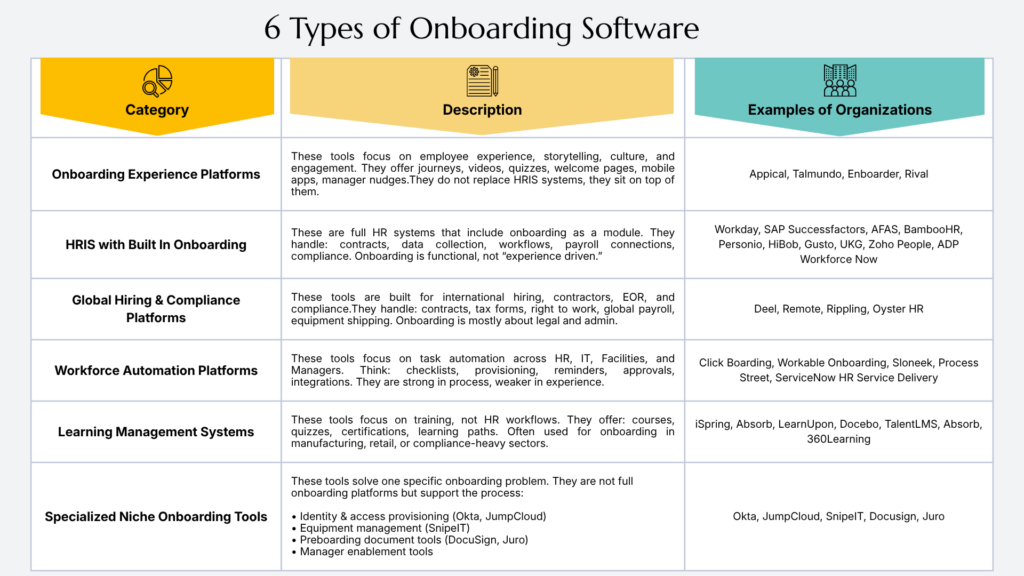
Not every platform solves the same problem: some focus on the employee experience, others on workflows, compliance, or training. Understanding the six main categories helps you see quickly which type of software fits your organization.
1. Onboarding Experience Platforms
Onboarding experience platforms such as Appical, Talmundo, and Enboarder focus entirely on the human side of the onboarding process. They emphasize storytelling, company culture, and maintaining early engagement.
They achieve this through interactive employee journeys, personalized welcome pages, videos, quizzes, mobile apps, and automated reminders (nudges) for managers.
The human connection during preboarding
The greatest value of these platforms lies in the period before the first workday (preboarding). Once the contract is signed, new employees often fall into a black hole. This software bridges that quiet period by warming up the new colleague to the company culture and taking away their initial nerves.
Although these tools drastically improve the employee experience, they are not designed to manage the administrative foundation. Therefore, they do not replace an HRIS (HR information system), but function as an interactive layer built on top of it.
The formal data (such as contracts and bank details) flows from the HRIS, after which the experience platform translates that data into a warm and visual welcome journey.
2. HRIS with Built‑In Onboarding
HRIS platforms (HR information systems) such as AFAS, BambooHR, Personio, and HiBob offer onboarding as an integrated part of their comprehensive HR software.
These systems manage the entire administrative process: from contract signing and data collection to internal workflows, integration with payroll administration, and compliance.
As a result, their approach to onboarding is primarily functional and process-oriented, rather than experience-oriented.
One central source of truth, yet very administrative
The big advantage of an HRIS is efficiency and data security. All new employee data is stored directly in the right place; no manual data transfer to other systems is required, and privacy (GDPR) is immediately properly managed.
The downside is that onboarding can quickly feel like an administrative checklist. The focus lies on filling out forms, uploading ID documents, and digitally signing documents.
For a new employee eager to start, these systems often lack the visual atmosphere, the transfer of culture, and the genuine ‘fun’ factor that a dedicated experience platform offers.
3. Global Hiring & Compliance Platforms
Global recruitment and compliance platforms such as Deel, Remote, and Rippling are specifically designed for international employment and remote teams.
Onboarding within these systems revolves entirely around local employment contracts, tax forms, right-to-work checks, global payroll administration, and the logistics surrounding IT equipment.
The focus here is purely on the legal and administrative aspects, rather than on culture or the employee experience.
Hiring across borders without legal headaches
The big value of these platforms (often operating as Employer of Record) is that they eliminate the complexity of international laws and regulations. Through this software, a company can legally hire someone within a few mouse clicks in a country where it does not have an entity or office of its own.
The software ensures that the contract and onboarding comply 100% with the local legislation of that specific country.
4. Workflow Automation Platforms
Workflow automation tools such as Click Boarding, Workable Onboarding, and Sloneek streamline operational tasks behind the scenes. They connect HR, IT, facility management, and managers to ensure internal preparation runs smoothly.
These platforms excel in cross-departmental checklists, the automatic provisioning of IT accounts and permissions, automatic reminders, approvals, and software integrations.
The bridge between departments, but without the ‘soft’ landing
The real power of this software lies in breaking down silos within the organization. Often, IT only finds out at the last minute that a laptop is needed, or facility management knows nothing about a new access card.
This type of software fully automates that handover. Although these platforms are rock-solid in this underlying process automation, they are less geared towards the employee experience.
They ensure that logistics are correct on the first workday, but offer few tools for culture transfer, interactive introductions, or the social welcome feeling for the new employee.
5. Learning Management Systems for Onboarding
Learning management systems such as iSpring, Absorb, and LearnUpon support onboarding through highly structured, scalable training.
While traditional onboarding tools focus on paperwork and IT provisioning, an LMS focuses entirely on knowledge retention and speed-to-productivity. They deliver interactive courses, quizzes, certifications, and automated learning paths tailored to specific roles.
Instead of forcing HR to host repeated training sessions, an LMS automates the entire curriculum. This makes them incredibly popular in manufacturing, retail, healthcare, or compliance-heavy environments where new hires cannot safely or legally perform their jobs without formal certification.
6. Specialized Niche Onboarding Tools
Specialized niche tools address one specific part of onboarding. Identity and access provisioning tools like Okta or JumpCloud, equipment management tools like SnipeIT, preboarding document tools like DocuSign or Juro, and manager‑enablement tools all support the onboarding process without functioning as full platforms.
Be mindful that these tools aren’t built only for onboarding, they serve broader operational needs. But if they solve a specific gap in your process, you can absolutely use them as part of your onboarding setup.
How to Choose the Best Onboarding Software
A key decision in choosing onboarding software is whether you want a dedicated onboarding tool or an HR platform that includes onboarding as part of a broader system.
Many small and mid‑sized companies prefer an all‑in‑one HRIS because it combines onboarding with HR data, payroll, and basic workflows. Tools like BambooHR, Zoho People, Workable, or UKG fall into this category.
Younger or fast‑growing companies sometimes choose a stand‑alone onboarding solution instead. Products such as Click Boarding or mobile‑first platforms like Appical offer deeper onboarding journeys, stronger automation, or a more engaging new‑hire experience without requiring a full HR suite.
Whichever direction you choose, the software should cover your essentials. Here’s a step-by step guide to help you make the right decision.
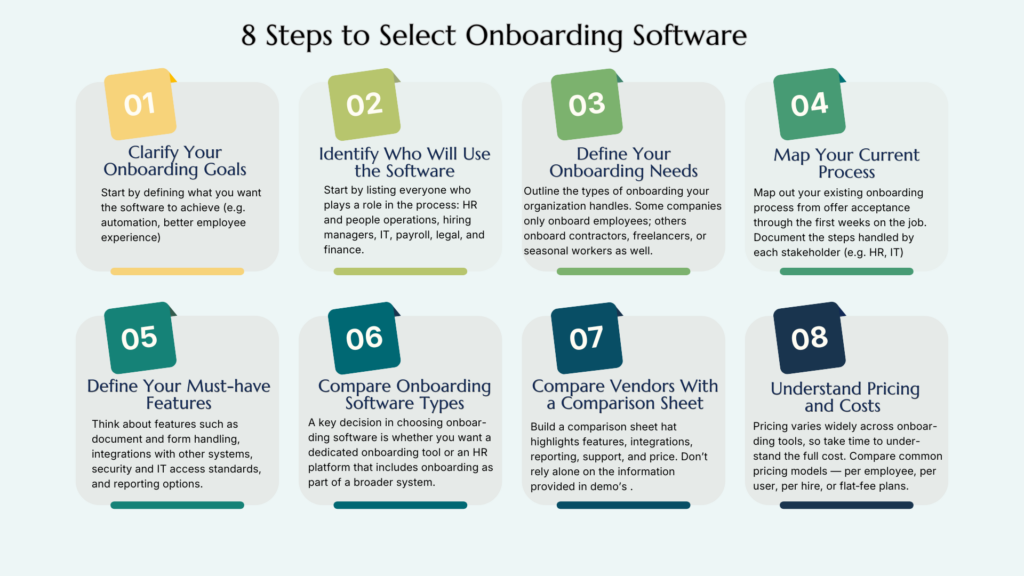
Step 1: Clarify Your Onboarding Goals
Start by defining what you want the software to achieve. Think big picture here. Most organizations look for onboarding tools because their current process is too manual, too inconsistent, or too dependent on individual managers.
Clarifying your goals helps you filter out tools that look impressive but don’t solve your real problems. Typical goals include:
- reducing repetitive work for HR and managers
- preventing missed forms or late tasks
- improving the first‑week experience for new hires
- creating a consistent onboarding process across teams, locations, or countries
- educate employees that work in knowledge-intensive or compliance-heavy industries
When your goals are clear, you can evaluate software based on outcomes rather than only features.
Step 2: Identify Who Will Use the Software
Onboarding involves more people than most HR-professionals realize. Start by listing everyone who plays a role in the process: HR and people operations, hiring managers, IT, payroll, legal, and finance.
Each group has different needs, and the software must support all of them without adding extra work. Also consider who will interact with the platform directly. Some organizations give new hires access to a portal; others include contractors, interns, or temporary workers.
Knowing your users upfront helps you understand what the interface, permissions, and workflows must support.
Step 3: Define Your Onboarding Needs
Here, you go into more detail about your onboarding needs. Outline the types of onboarding your organization handles. Some companies only onboard employees; others onboard contractors, freelancers, or seasonal workers as well.
Your needs may differ depending on whether your workforce is in‑office, remote, hybrid, or spread across multiple countries. It’s also important to note any special conditions.
High‑volume hiring requires automation and scalability. Regulated industries need strong compliance features. Highly customized onboarding requires flexible workflows.
Defining these scenarios early prevents you from choosing software that can’t support your reality.
Step 4: Map Your Current Process
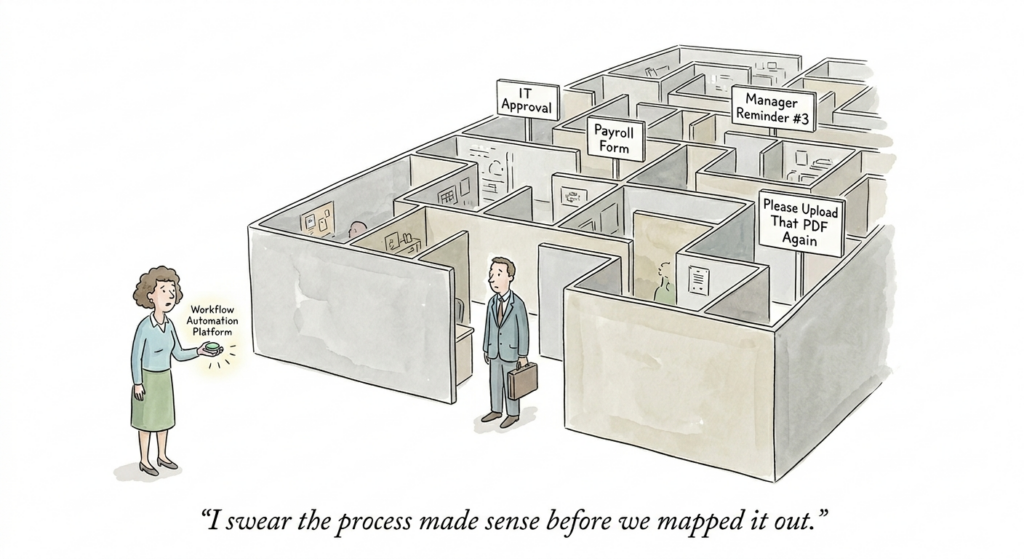
Before you look at vendors, map out your existing onboarding process from offer acceptance through the first weeks on the job. Document the steps handled by stakeholders such as HR, managers, IT, and payroll so you can see the full picture.
Then, identify where things break down: delays, repeated data entry, unclear responsibilities, or steps that depend on manual reminders. This gives you a clear view of what needs improvement.
Finally, establish a simple baseline. Track how long onboarding tasks take, how often they are completed on time, and how many HR hours go into each new hire.
These numbers help you evaluate whether a tool will actually make your process faster, smoother, and more reliable.
Step 5: Define Your Must‑have Features
Once you understand your goals, users, and process, you can define the features you truly need. Most organizations require a few core capabilities. You’ll most likely need workflow automation to coordinate tasks across HR, managers, and IT.
You’ll need reliable document and form handling for contracts, policies, and required paperwork. A clear self‑service experience for new hires is essential so they can complete tasks and track their progress.
Integrations matter too. The software should connect smoothly with your HRIS, ATS, payroll, and IT systems. Reporting gives you visibility into task completion and bottlenecks.
Also, strong security and access controls ensure the right people see the right information. These categories help you separate essential functionality from nice‑to‑have extras.
Last, determine if your onboarding tools need native course-building features, or if they need a seamless integration with an LMS. If compliance training, role-specific certifications, or tracking exam completion rates are vital on day one, an LMS (module) is a “must-have” feature.
Step 6: Compare Onboarding Software Types
Once you understand your needs, compare the main categories of onboarding software as displayed earlier in this blog.
All‑in‑one HR platforms make sense when you want fewer vendors and a single source of employee data. They offer convenience and consistency, but their onboarding modules are often less flexible than dedicated tools.
Dedicated onboarding platforms are a better fit when you need deeper workflow control or a stronger new‑hire experience. These tools excel at automation, engagement, and cross‑functional coordination, but you may still need separate systems for HR, payroll, or IT.
HRIS add‑ons and basic onboarding modules work well for smaller teams or straightforward processes. They handle standard forms and simple steps reliably, but they can fall short when workflows become complex or when you’re onboarding across multiple countries.
Step 7: Compare Vendors with a Comparison Sheet
To make the comparison easier, build a comparison sheet that highlights features, integrations, reporting, support, and price. Focus on what matters for buying decisions rather than marketing claims, and note where each software type performs best.
A comparison sheet also helps you evaluate vendors consistently. Start by creating weighted criteria based on your priorities — must‑have features, integrations, support quality, security, and price.
Keep the comparison sheet simple enough to use during demos, and make sure the weights reflect your business needs rather than what vendors emphasize. Then, test real onboarding scenarios.
Run one scenario for an office‑based hire, one for a remote hire, and one that requires cross‑functional coordination. This shows how the software performs in situations that mirror your actual process.
Review the admin experience as well. Test how quickly you can set up workflows, edit templates, adjust tasks, and generate reports. Pay attention to how easy it is to correct mistakes and whether the tool requires ongoing vendor support for basic changes.
Finally, I recommend that you ask for proof from similar customers. Request references from companies with comparable size and onboarding needs. Ask how long implementation took, where friction appeared, and how the vendor handled support during rollout.
Step 8: Understand Pricing and Total Cost
Pricing varies widely across onboarding tools, so take time to understand the full cost. Compare common pricing models — per employee, per user, per hire, or flat‑fee plans — and choose the one that aligns with your hiring patterns.
Check whether pricing scales as headcount grows or if additional modules increase the cost. Look beyond subscription fees. Some vendors charge for setup, implementation support, data migration, training, or premium support.
Others add costs for integrations, extra administrators, or advanced features. Review contract terms carefully so you understand how renewal and expansion will work. Finally, evaluate the return on spend.
Estimate how much time HR and managers will save, how many errors or delays the software will eliminate, and how much smoother the new‑hire experience will become.
Tie these improvements to real business outcomes rather than vague efficiency claims so you can justify the investment with confidence.
The Best Fit For You: Onboarding Software by Company Type
Best Fit for Small Businesses
Small businesses need onboarding software that is easy to set up, low‑maintenance, and doesn’t require a full HR tech stack.
Tools like BambooHR work especially well here because they combine HRIS + onboarding in one system and offer templates, e‑signatures, and simple checklists — ideal for companies with 20–200 employees (as described in your attached blog).
For very small teams or startups, Gusto is a strong fit because it bundles payroll, onboarding forms, and basic workflows in a single platform, reducing the need for multiple vendors.
Companies that want a lightweight, experience‑driven tool can also consider Appical or Talmundo, which offer preboarding journeys and welcome content without requiring a full HRIS.
Best for: Small HR teams, startups, companies with simple processes, organizations without a dedicated HRIS.
Best Fit for Growing Teams
Growing teams need software that scales with them. They usually need stronger automation, deeper reporting, and integrations with HRIS, payroll, and IT.
Rippling is a strong fit here because it connects onboarding with IT provisioning, equipment shipping, and global payroll as companies expand. It is consistently ranked as a top onboarding solution for scaling organizations.
Personio and HiBob are also excellent for mid‑market companies. They offer structured workflows, role‑based access, and integrations with ATS, payroll, and identity tools. If a company wants more control over workflows, Click Boarding or Workable Onboarding provide deeper automation and cross‑department task coordination.
Best for: Companies growing from 50–500 employees, multi‑location teams, organizations adding new departments or functions.
Best Fit for Enterprise HR teams
Enterprise organizations require advanced permissions, audit trails, complex approvals, and global compliance. Workday and ADP Workforce Now are widely used in enterprise environments because they combine onboarding with full HR, payroll, and compliance management at scale.
Both are consistently recommended for large organizations with complex HR operations. HiBob also fits enterprise‑level needs when companies want a modern interface with global workflows and multilingual support.
Enterprises with strict compliance requirements often choose Click Boarding, which is known for its strong workflow governance and audit‑ready processes.
Best for: Global companies, regulated industries, organizations with complex approval flows, companies with 1,000+ employees.
Best Fit for Remote or Distributed Teams
Remote teams need onboarding software that supports asynchronous work, mobile access, and clear self‑service tasks.
Enboarder is one of the strongest options here because it focuses on engagement, nudges, and mobile‑friendly journeys, ideal for distributed teams.
Rippling is also a good choice for remote companies because it automates IT provisioning, ships equipment globally, and supports remote payroll and compliance.
For teams with field workers or mobile‑first roles, tools like WorkBright are recommended for mobile document collection and remote form completion. If a company needs global compliance for remote hires,
Deel and Remote are purpose‑built for international onboarding, right‑to‑work checks, and contractor management.
Best for: Remote‑first companies, distributed teams across time zones, organizations hiring internationally.
Best Fit for Training-intensive and Highly Regulated Industries
For organizations in fields like healthcare, biotech, financial services, manufacturing, or heavy retail, onboarding isn’t just about a warm welcome—it’s a strict regulatory requirement.
If a single skipped safety module or unread policy update can result in compliance penalties or operational friction, a standalone workflow or basic HRIS checklist isn’t enough.
You need a dedicated LMS or an onboarding tool that tightly integrates with one. Systems like iSpring, Absorb, or D2L are built exactly for this. They track granular progress, trigger automatic reminders for expiring certifications, and build an airtight, audit-ready data trail.
Best for: Companies with strict legal compliance standards, heavy safety/operational regulations, or complex, technical roles requiring deep product training from day one.
Implementation
Implementation of onboarding software usually takes anywhere from a few weeks up to several months. A basic software tool can be live in a matter of a few weeks, whilst complex enterprise-wide HRIS-system (such as Workday or SAP Successfactors) can easily take several months. Inquire about this when you compare vendors.
Conclusion
Investing in onboarding software makes sense when your current process creates delays, inconsistencies, or too much manual work. The right tool reduces admin, improves the new‑hire experience, and gives HR and managers a reliable structure.
In this guide I showed you why understanding the six different categories of onboarding software matters. Experience platforms, HRIS modules, workflow automation tools, global hiring & compliance solutions, LMS‑based onboarding, and niche add‑ons each solve different problems.
Knowing the difference helps you avoid choosing a tool that looks good in a demo but doesn’t fit your real needs.To help you navigate the selection process, we covered eight steps to select the best onboarding software in this guide.
To keep your vendor reviews consistent, use the comparison sheet I have attached in this blog, so you can evaluate each tool against the same criteria instead of relying on polished demos.
And remember the main buying rule: the best onboarding software is the one that fits your organization’s goals, workflows, and growth plans.